UR Code 3D:2D Matching
Perform a Certified Liveness Check with the FaceTec SDK and match the Liveness-Proven 3D FaceMap to the 2D Face Data stored in the UR Code.
Introduction and Background
UR Codes store a mathematical representation of the User's Face as a 72-byte Face Vector. FaceTec's Neural Networks are specially trained to achieve great performance, despite the minuscule data size of these Face Vectors.
Because this representation is tamper-proof, the authenticity of the image can be trusted and used for matching against a UR Codeholder's Liveness-Proven 3D FaceMap. This enables both Identity Issuers and Relying Parties to build their own verification systems to establish trust with UR Codeholders.
Live Users can be matched to the 2D Face Data stored in a UR Code with very high accuracy due to the ability of FaceTec's 3D AI to recreate any 2D photo of a User from a 3D FaceMap. This allows UR Code 3D:2D Matching to return Matches with a False Acceptance Rate (FAR) of 99.99995% (i.e., a 1 in 2,000,000 FAR) and a False Rejection Rate (FRR) that is less than 1%.
Important Note: UR Code 3D:2D Matching is currently only available for testing on the FaceTec Server SDK. Please see the Setting up the Server SDK Guide and the Server SDK's /match-3d-2d-ur-code API Definition for more information.
3D:2D Match Levels
UR Code 3D:2D Match Levels & associated accuracy:
Match Level 9 - 99.99995% (1/2,000,000 FAR)
Match Level 8 - 99.9999% (1/1,000,000 FAR)
Match Level 7 - 99.9998% (1/500,000 FAR)
Match Level 6 - 99.999% (1/100,000 FAR)
Match Level 5 - 99.99% (1/10,000 FAR)
Match Level 4 - 99.9% (1/1,000 FAR)
Match Level 3 - 99.8% (1/500 FAR)
Match Level 2 - 99.6% (1/250 FAR)
Match Level 1 - 99% (1/100 FAR)
Match Level 0 - Non-match
Getting Started
The components of the solution are:
The User performs a 3D FaceScan with Your Application and enrolls their Liveness-Proven 3D FaceMap in Your Database (requires FaceTec's /enrollment-3D API).
Your application retrieves the UR Code Image Data.
Your secure web service determines the appropriate externalDatabaseRefID* for fetching the User's 3D FaceMap and passes both the UR Code Image Data and the externalDatabaseRefID* to the FaceTec Server SDK via the /match-3d-2d-ur-code API.
The Match Level is returned along with other metrics, and Your App determines how to proceed based on the results and your business logic.
* Note: The externalDatabaseRefID is 100% controlled by your business logic and code. FaceTec does not set this internally (but we do demonstrate how to set it in our samples). Setting & Retrieving the externalDatabaseRefID should be done in Server-Side Code, not your Device-Side code.
UR Code 3D:2D Matching Architecture
Below is a high-level overview of how a UR Code is generated and used in 3D:2D Matching.
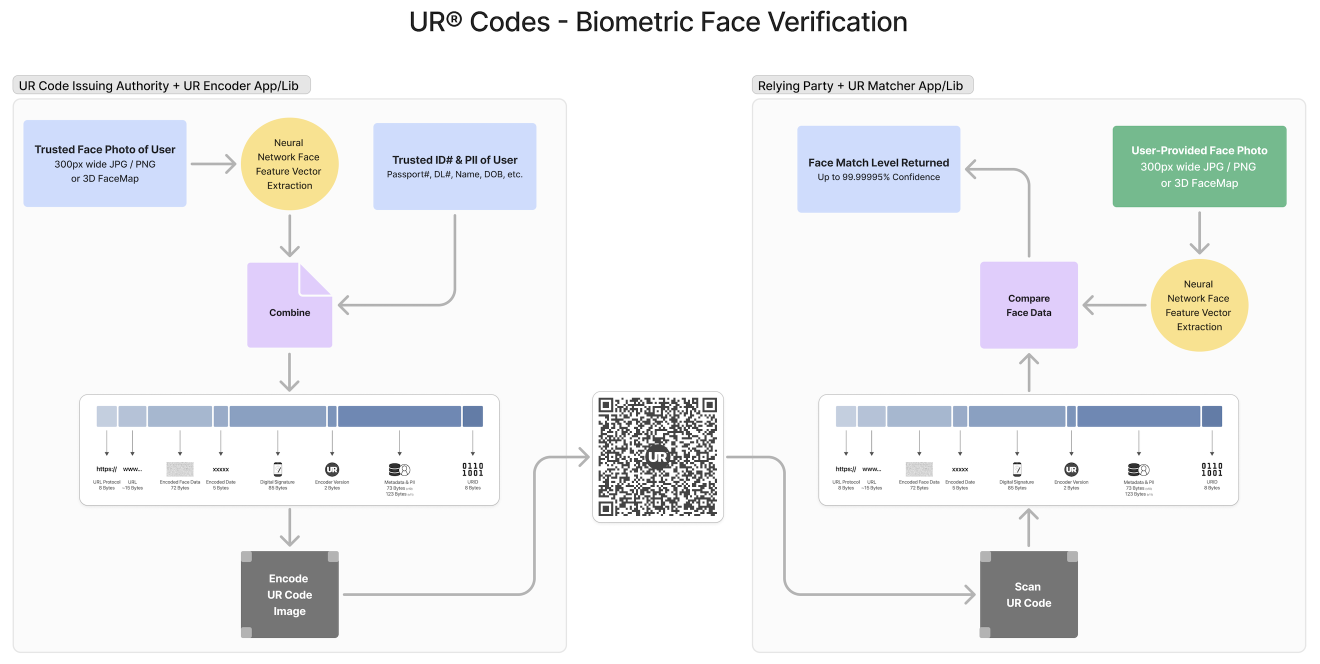
Recommended Use: 3D Liveness Check, then UR Code Scan
We believe the best way to stop Identity Theft is to ask a potential fraudster to put their face on camera and prove their Liveness. Performing a 3D Liveness Check before scanning the UR Code is the best defense against stolen UR Codes being used. FaceTec highly recommends that the 3D Liveness Check be done first, but we still allow Developers to switch the order of the UR Code Scan and the 3D Liveness Check to match their development and production needs.
Setting and Building Logic for Match Levels
You are responsible for setting the Match Level Thresholds for Acceptance in your Application. The default minimum Match Level is set to Match Level 4 (1/1,000 FAR). Please note that at 1/1,000 FAR, with 8 Billion+ People in the World, means that (8,000,000,000 / 1,000) = 8,000,000 other People in the World will receive Match Level 4 against a given comparison. Because of this, FaceTec does not consider Match Levels 1-5 a "strong match". Match Level 6 (1/100,000 FAR) is a relatively strong Match. Match Level 7 is a strong Match, but still four times less accurate than Match Level 9 (the highest Match Level that can be returned).
The Match Levels that are returned are dependent on the quality of the image used to generate the UR Code's 2D Face Vector. UR Codes generated with Low-Quality Face Images will generally return lower Match Levels.