UR Code Templates & Metadata Minification
Learn more about how UR Code Templates are used to define UR Codes.
UR Code Template System
The UR Code Template System allows Issuing Authorities to specify the type of UR Codes being created. By defining the data structure ahead of time, UR Code Templates minimize the amount of data that needs to be stored within the UR Code itself. Templates also ensure the metadata is inputted and extracted in a consistent manner for an Application's Display Logic. The UR Code Scan+Match Apps and UR Scan+Match Device SDKs rely upon the Templated Format in their own Display Logic to display the metadata in its User Interface.
UR Code Template Files
The UR Code Template System currently includes the following Template Files:
| Template Name | Use Cases | Fields |
|---|---|---|
| Basic Identification |
|
|
| Passport |
|
|
| Driver's License |
|
|
| Age Validation Card |
|
|
| Business Card |
|
|
| Student Identification Card |
|
|
| Law Enforcement ID Card |
|
|
| Law Enforcement Training Card |
|
|
| Weapon Carry License |
|
|
| First Responder ID Card |
|
|
| Medical ID Card |
|
|
| Medical Locator Bracelet |
|
|
| ACH Payment (Automated Clearing House) |
|
|
| Credit Card Payment Details |
|
|
| Crypto Wallet Address |
|
|
| Married Couple Details |
|
|
| Parent and Child Details |
|
|
| Three-Person Combination Code |
|
|
| Brazil National ID (CIN) |
|
|
Template Data Types
Each field in a UR Code Template has a Data Type, which determines the possible values that can be specified. By specifying the Data Types, the UR Code Template System can specify field values with fewer bytes than what is required for a normal Raw String.
| Data Type | Description | Examples |
|---|---|---|
| Boolean |
|
|
| Sex |
|
|
| ISO Calendar Date |
|
|
| Integer |
|
|
| Compressed String |
|
|
| Raw String |
|
|
Creating UR Codes with Templates
For Issuing Authorities, UR Code Template Schemas can be used to define the metadata in a UR Code. A UR Code can be created by downloading the appropriate Template Schema and updating the empty field values. The updated schema can then be used in the /create-ur-code-from-2d-image API to create a UR Code with the Templated Metadata.
A script can also be used to create UR Codes from an existing database by creating a Metadata JSON Object and API Request Payload for each Database Document that needs a UR Code. Once the payloads have been generated, the script can then proceed to create a batch of UR Codes. For an example of this, please see node_batch_sample_app.js in the UR Encoder SDK.
Creating Display Logic with Templates
For Relying Parties, UR Code Template Schemas can be used to identify the Metadata Fields in advance. This can be used to define Display Logic that is dependent on specific Template Keys and Field Keys.
The below example shows how Template Keys and Field Keys can be used to determine if a Driver's License has expired.
// A function to determine if a Driver's License has expired.
function isDriversLicenseExpired(metadata) {
  const metadataObj = JSON.parse(metadata);
  const templateKey = metadataObj["templateKey"];
  if (templateKey == "DriversLicense") {
    const fields = metadataObj["fields"][0];
    for (i = 0; i < fields.length; i++) {
      const field = fields[i];
      if (field["fieldKey"] == "ExpirationDate") {
        const expirationDate = new Date(field["value"]);
        const currentDate = new Date();
        if (currentDate >= expirationDate) {
          return "The Driver's License is expired.";
        }
        else {
          return "The Driver's License is still valid.";
        }
      }
    }
  }
  return "This document is not a Driver's License.";
}
Template Schema Example
Below is an example of the UR Code Template Schema for a Driver's License:
{
  # Template Name:            Driver's License
  # Template Description:     A Template for specifying an individual's Driver's License Information in a UR Code.
  # Template System Info:     The UR Code Template System allows Issuing Authorities to specify the type of UR Codes
  #                           being created. By defining the data structure ahead of time, UR Code Templates minimize
  #                           the amount of data that needs to be stored within the UR Code itself. Templates also ensure
  #                           the metadata is inputted and extracted in a consistent and organized manner for an
  #                           Application's Business Logic. The UR Code Scan+Match Apps and UR Code Scan+Match SDKs rely upon
  #                           the Templated Format in their own Business Logic to display the metadata in its User Interface.
  #
  #                           For more information about Templates, please see https://dev.urcodes.com/ur-code-templates-metadata-minification.
  # Data Type Info:           The Data Type required for each field is specified in its Field Header.
  #                           For a table of the available Data Types, please see
  #                           https://dev.urcodes.com/ur-code-templates-metadata-minification#template-data-types.
  # Using Templates:          For Issuing Authorities, UR Code Template Schemas can be used to define the metadata
  #                           in a UR Code. For more information, please see Creating UR Codes with Templates
  #                           <https://dev.urcodes.com/ur-code-templates-metadata-minification#creating-ur-codes-with-templates>.
  #
  #                           For Relying Parties, UR Code Template Schemas can be used to identify the Metadata Fields
  #                           in advance. This can be used to define Business Logic that is dependent on specific Template Keys
  #                           and Field Keys. For more information, please see Creating Display Logic with Templates
  #                           <https://dev.urcodes.com/ur-code-templates-metadata-minification#creating-display-logic-with-templates>.
  # Need Additional Fields?   If you need a field that is not specified below or need a new template created, then please visit the
  #                           https://dev.urcodes.com/request-support to contact support.
  "templateKey": "DriversLicense",
  "numberOfPersons": 1,
  "fields": [
    [
      -----------------BEGIN REQUIRED FIELDS-----------------
      -----------------END REQUIRED FIELDS-------------------

      -----------------BEGIN OPTIONAL FIELDS-----------------
      # Field Name:           Full Name
      # Field Description:    The Full Name on the Driver's License.
      # Data Type:            Compressed String
      # Example Value:        Ex. JOHN SMITH
      {
          "fieldKey": "FullName",
          "value": "",
      },

      # Field Name:           Date of Birth
      # Field Description:    Date of Birth on the Driver's License.
      # Data Type:            ISO Calendar Date
      # Example Value:        Ex. 1985-10-31
      {
          "fieldKey": "DateOfBirth",
          "value": ""
      },

      # Field Name:           Driver's License Number
      # Field Description:    The Driver's License Number.
      # Data Type:            Compressed String
      # Example Value:        A1234567
      {
          "fieldKey": "DriversLicenseNumber",
          "value": ""
      },

      # Field Name:           Height
      # Field Description:    The Height specified on the Driver's License.
      # Data Type:            Raw String
      # Example Value:        67 in
      {
          "fieldKey": "Height",
          "value": ""
      },

      # Field Name:           Weight
      # Field Description:    The Weight specified on the Driver's License.
      # Data Type:            Raw String
      # Example Value:        180 lb
      {
          "fieldKey": "Weight",
          "value": ""
      },

      # Field Name:           Eye Color
      # Field Description:    The Eye Color specified on the Driver's License.
      # Data Type:            Compressed String
      # Example Value:        BLU
      {
          "fieldKey": "EyeColor",
          "value": ""
      },

      # Field Name:           Hair Color
      # Field Description:    The Hair Color specified on the Driver's License.
      # Data Type:            Compressed String
      # Example Value:        BRN
      {
          "fieldKey": "HairColor",
          "value": ""
      },

      # Field Name:           Issue Date
      # Field Description:    The Date that the Driver's License was Issued.
      # Data Type:            ISO Calendar Date
      # Example Value:        Ex. 2022-07-14
      {
          "fieldKey": "IssueDate",
          "value": ""
      },

      # Field Name:           Expiration Date
      # Field Description:    The Date that the Driver's License is set to expire.
      # Data Type:            ISO Calendar Date
      # Example Value:        Ex. 2027-10-31
      {
          "fieldKey": "ExpirationDate",
          "value": ""
      },

      # Field Name:           State
      # Field Description:    The State specified on the Driver's License.
      # Data Type:            Compressed String
      # Example Value:        Ex. CA
      {
          "fieldKey": "State",
          "value": ""
      },

      # Field Name:           Country
      # Field Description:    The Country specified on the Driver's License.
      # Data Type:            Compressed String
      # Example Value:        Ex. USA
      {
          "fieldKey": "Country",
          "value": ""
      }

      # Field Name:           Sex/Gender
      # Field Description:    The Sex/Gender specified on the Driver's License.
      # Data Type:            Sex/Gender
      # Example Value:        Ex. M
      {
          "fieldKey": "Sex",
          "value": ""
      }
      -----------------END OPTIONAL FIELDS-------------------
    ]
  ],
  "textBelowURCode": "",
  "textBottomRightInsideURCode": ""
}
Text & Language Customization
The strings in the UR Code Templates can be customized in the UR Scan+Match Device SDKs. To learn how to customize these strings, please see the UR Code Template - Text & Language Customization Guide.
Displaying Text within (or beneath) UR Codes
Each UR Code Template contains the textBelowURCode and textBottomRightInsideURCode properties. The text specified for these properties is either printed below the UR Code (textBelowURCode) or in the bottom-right corner of the UR Code (textBottomRightInsideURCode).
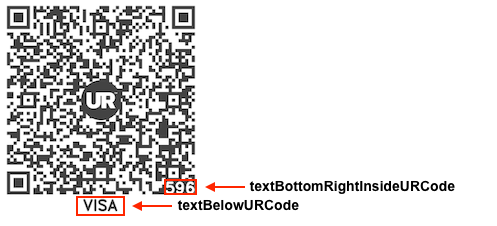
The Printed Text is not encoded into the UR Code itself and is not returned in the metadata when the UR Code is scanned.
Custom Fields & UR Code Templates
FaceTec can add new Fields or create new UR Code Templates to support your Use Case requirements.
If you require specific Fields or want a new UR Code Template created that is not listed in this guide, please Send FaceTec a Support Request to contact support.